
Last updated on
Nov 7, 2026

CA FL-300-INFO 2025-2026 free printable template
pdfFiller is not affiliated with any government organization

Fill out
Complete the form online in a simple drag-and-drop editor.

eSign
Add your legally binding signature or send the form for signing.

Share
Share the form via a link, letting anyone fill it out from any device.

Export
Download, print, email, or move the form to your cloud storage.
Why pdfFiller is the best tool for your documents and forms


End-to-end document management
From editing and signing to collaboration and tracking, pdfFiller has everything you need to get your documents done quickly and efficiently.
Accessible from anywhere
pdfFiller is fully cloud-based. This means you can edit, sign, and share documents from anywhere using your computer, smartphone, or tablet.
Secure and compliant
pdfFiller lets you securely manage documents following global laws like ESIGN, CCPA, and GDPR. It's also HIPAA and SOC 2 compliant.
What is CA FL-300-INFO
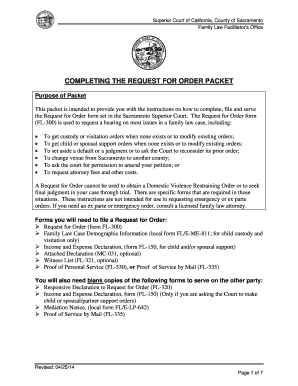
The California Request for Order Form FL-300 is a legal document used by individuals involved in family law cases to request new court orders or modify existing orders.
pdfFiller scores top ratings on review platforms




Who needs CA FL-300-INFO?
Explore how professionals across industries use pdfFiller.

CA FL-300-INFO is needed by:
-
Petitioners looking to schedule court hearings
-
Respondents aiming to contest requests
-
Parents wanting to modify child custody agreements
-
Guardians seeking changes to visitation rights
-
Individuals applying for temporary emergency orders
-
Legal representatives assisting clients with family law matters
Comprehensive Guide to CA FL-300-INFO
What is the California Request for Order Form FL-300?
The California Request for Order Form FL-300 is essential in family law, facilitating the scheduling of court hearings to modify existing orders. This form plays a crucial role when addressing matters such as child custody and visitation. In cases where current orders need alterations, utilizing the FL-300 form allows petitioners to seek necessary modifications effectively.
Common scenarios applicable for this form involve situations like expired restraining orders and disputes regarding child support and visitation rights. By submitting this request, individuals can address their legal needs while ensuring the court recognizes their concerns and requirements.
Purpose and Benefits of Using the California Request for Order Form FL-300
The primary purpose of the California Request for Order Form FL-300 is to clarify the reasons for filing a request, especially when dealing with expired restraining orders or the need to change existing child custody arrangements. By formally submitting this request, users benefit from the court's enforcement of compliance regarding new orders.
Modifying existing child custody or visitation orders is crucial for reflecting any changes in circumstance or ensuring the welfare of children involved. This formalized process helps maintain legal clarity and accountability, making it easier for both parties to adhere to the stipulated agreements.
Who Needs to Use the California Request for Order Form FL-300?
Both the Petitioner and Respondent in family law cases can find this form necessary. The Petitioner typically files the form to seek changes, while the Respondent may need to respond to these modifications. Situations that prompt the filing of the FL-300 form include requests for child custody changes or temporary emergency orders related to family law.
Eligibility criteria hinge on the circumstances of the case, necessitating individuals to understand whether their situation qualifies for using this specific California court hearing request. It's essential for parties involved to identify their roles and the correct procedures to ensure compliance with legal standards.
How to Fill Out the California Request for Order Form FL-300 Online (Step-by-Step)
To complete the California Request for Order Form FL-300 online, follow these steps:
-
Access the form using pdfFiller's platform.
-
Enter required personal information, ensuring that details such as names and addresses are accurate.
-
Select the type of order requested based on your case needs.
-
Provide detailed information relevant to the request, including any pertinent case details.
-
Review all information for accuracy before final submission.
By keeping these steps in mind and utilizing tools available on pdfFiller, users can streamline the process and minimize the potential for errors.
Required Documents and Supporting Materials for Your Request
When preparing your California Request for Order Form FL-300, consider the following essential documents:
-
Proof of service for notification to involved parties.
-
Additional forms as required for specific requests, such as custody or child support modifications.
-
Any previous court orders that are relevant to your case.
Having all necessary documentation prepared in advance is crucial for ensuring a smooth submission process and reducing common errors that may arise due to incomplete filings.
Submission Methods and Delivery of the California Request for Order Form FL-300
There are multiple methods available for submitting the California Request for Order Form FL-300:
-
In-person submission at the local court.
-
Online submission through a designated platform like pdfFiller.
-
Submitting by mail to the appropriate court address.
Be sure to submit the form correctly, as late filing or errors in submission can lead to complications in the court process, potentially affecting the outcomes of your request.
What Happens After You Submit the California Request for Order Form FL-300?
After submission, you can expect the following:
-
A confirmation of your submission from the court.
-
Timelines for processing your request, which may vary based on the court's schedule.
-
Instructions on how to track the status of your submission, allowing you to stay informed of any updates or required actions.
Understanding common rejection reasons can also prepare you for any potential issues that may arise post-submission, ensuring you remain proactive in your legal matters.
Security and Compliance in Filing the California Request for Order Form FL-300
Data security is paramount when handling sensitive legal documents like the California Request for Order Form FL-300. pdfFiller employs robust security measures, including 256-bit encryption and compliance with legal regulations such as HIPAA and GDPR, to protect user information and maintain confidentiality.
When filing legal documents online, it's essential to ensure that the platform used adheres to high standards of privacy and data protection, safeguarding your information throughout the process.
Sample or Example of a Completed California Request for Order Form FL-300
A visual representation of a completed California Request for Order Form FL-300 can be invaluable. Step through each section based on the sample to understand how to fill it out correctly. Focus on elements such as personal information, request specifications, and supporting details.
Using this example as a guide can help you avoid common mistakes and streamline the completion process, ensuring that your submission meets all required standards.
Utilizing pdfFiller for Your California Request for Order Form FL-300
pdfFiller offers key capabilities that support users in completing the California Request for Order Form FL-300 with ease. With features like editing text, creating fillable forms, and eSigning, users can efficiently manage their legal forms online, eliminating the need for cumbersome downloads.
Utilizing pdfFiller not only streamlines the process of filling out legal documents but also ensures a secure management experience, granting users peace of mind during their filings.
How to fill out the CA FL-300-INFO
-
1.Access the California Request for Order Form FL-300 by visiting pdfFiller and searching for the form name in the search bar.
-
2.Click on the document to open it in the pdfFiller editor, where you’ll see fillable fields and tools on the side.
-
3.Before completing the form, gather essential information such as personal details, case number, and specifics about the requested order.
-
4.Start filling out the form by entering your personal information, including your name, address, and contact details in the specified fields.
-
5.Clearly state the type of order you are requesting and provide any relevant details about your family law case.
-
6.Review all completed sections to ensure that no information is missing and that your requests are clearly articulated.
-
7.Once you have filled out the form accurately, use the review feature to check for any errors or required changes.
-
8.When satisfied with the form’s content, save your work on pdfFiller. Choose to download it as a PDF or submit online if applicable.
-
9.If submitting electronically, follow the prompts to file the form according to court requirements. Ensure you meet any deadlines.

Who is eligible to use the California Request for Order Form FL-300?
Any individual involved in a family law case in California can use the FL-300 form, including petitioners and respondents needing to modify existing orders or request new ones.
What are the deadlines for filing the FL-300 form?
Deadlines can vary based on the type of request and local court rules. It's essential to check with your local court for specific filing deadlines related to family law cases.
How should I submit the completed FL-300 form?
You can submit the completed form either electronically through the court's online system, or by mailing it to the appropriate family court, depending on your local court’s submission policies.
What supporting documents do I need to file with the FL-300 form?
Supporting documents might include evidence substantiating your request, such as previous court orders or financial records. Check with your local court for specific requirements.
What common mistakes should I avoid when filling out the FL-300 form?
Common mistakes include omitting required information, failing to sign the document, or not following instructions for specific sections. Thoroughly review your form before submission.
How long does it take to process the FL-300 form once submitted?
Processing times can vary depending on the court's workload. Typically, you should expect a response within a few weeks. Contact the court clerk for current processing times.
Is there a fee associated with filing the FL-300 form?
Filing fees may apply, and they can vary by county. It's advisable to check with your local courthouse for the most up-to-date fee information related to the FL-300 form.
CA FL-300-INFO Form Versions
Related Content
Related Forms




Get the latest insights from our blog


If you believe that this page should be taken down, please follow our DMCA take down process
here
.
This form may include fields for payment information. Data entered in these fields is not covered by PCI DSS compliance.